← Go back

Custom AI Workout Generator Built from Scratch

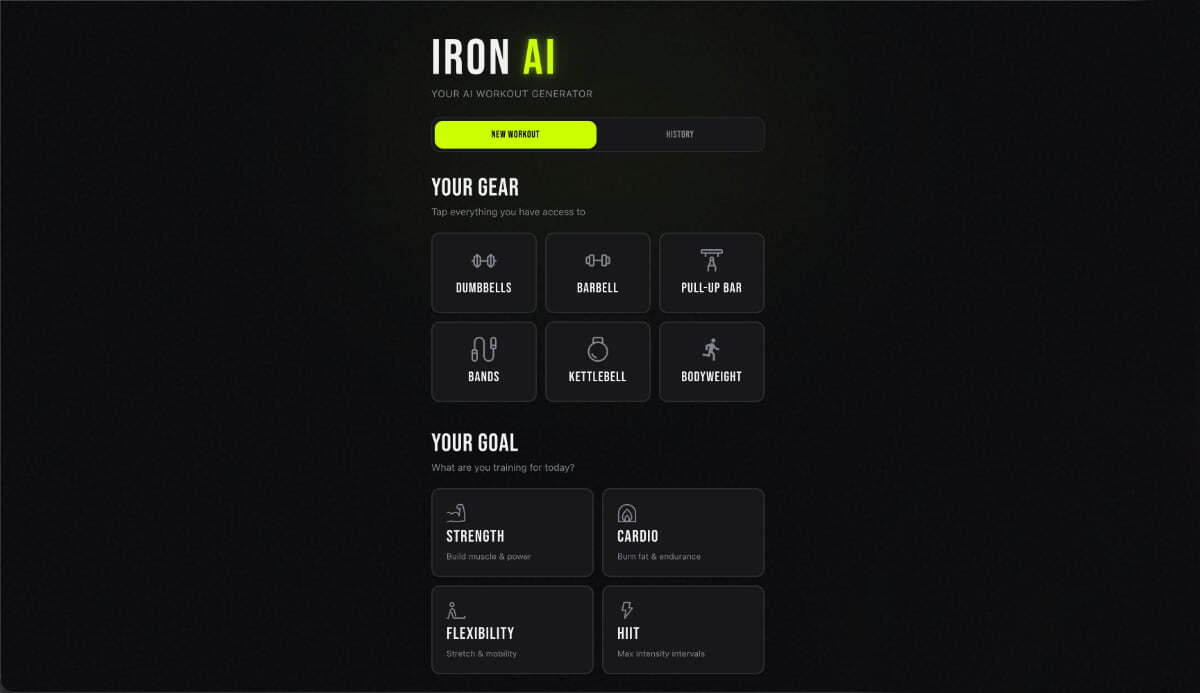
Macaly’s AI agent created a complete fitness app: dark gym aesthetics, intelligent equipment selection, AI-generated workouts with sets, reps, and rest times, real-time progress tracking, and workout history. Five prompts, one fully functional workout tool.

AI workout generator created with Macaly AI Builder
AI generation

1. Describe the app and get a working product

One prompt. It created the entire app: equipment selector, goal selection, duration slider, and an AI engine that generates complete workouts with exercise names, sets, reps, rest periods, technique tips, and estimated calories. Dark theme, neon details, and bold typography. Done.

“Create an AI workout generator. I choose the equipment, a goal (strength, cardio, flexibility, HIIT), and a duration (15–60 minutes), and it generates a complete workout with exercises, sets, reps, rest periods, and technique tips. Use a dark gym aesthetic with neon green accents. Track completion and save workout history.”

Database

2. Add real-time persistence

Workouts need to remain available after reloading the page. It configured a database with workouts linked to exercises, anonymous session tracking, and completion status for every set. Everything syncs in real time.

“Save workouts to a database so I can close the app and find them again. Track which exercises I have completed.”

Progress tracking

3. Create workout history

One sentence. It created a complete history view with goal, duration, estimated calories, progress bar, and relative timestamps. Tap a workout to review it or delete it with one click.

“Add a history tab where I can view and reopen my previous workouts.”

SVGs and illustrations

4. Replace emojis with appropriate icons

A design improvement. It replaced every emoji with selected SVG icons: dumbbells, barbell, kettlebell, resistance bands, running, yoga, and lightning, all configured to adapt automatically to the theme.

“Replace all emojis with beautiful illustrated icons.”

Custom design

5. Refine the experience and fix edge cases

The nested-button issue was identified and fixed. Keyboard navigation was added, and 18 tests were written and verified across the codebase. Zero errors.

“Fix the nested button error in workout history.”

What the agent built

AI-generated workouts, not templates

Every workout is generated from scratch based on equipment, goal, and duration: exercises, sets, reps, rest periods, and a realistic calorie estimate. Every session is unique.

Real-time progress tracking

Check off exercises as you go; progress is saved instantly to the database. Close the tab and return tomorrow: the workout will be exactly where you left it.

6 equipment types, 4 goals

Dumbbells, barbell, pull-up bar, resistance bands, kettlebell, and bodyweight. Strength, cardio, flexibility, and HIIT. Each combination adapts the workout to what you have.

Custom icon system

Selected SVG icons for dumbbells, kettlebells, and running, configured to adapt automatically to the theme. No emojis or icon fonts: clean, scalable vectors.

Cinematic gym aesthetic

Bold uppercase headings and neon green accents on an almost-black background. It looks like a premium workout app, not a weekend project.

Complete workout history

Every generated workout is saved and can be reviewed with its goal, duration, calories, and completion status visible at a glance. Delete anything you no longer need.

Completion celebration

Complete all exercises and receive a celebratory banner with the workout’s total statistics: that rewarding moment at the end.

18 tests, zero errors

Backend functions, workout logic, and page rendering were all verified before delivery.

Macaly AI

Bring your app, website, or project to life in minutes

1_ Create your free account 2_ Describe your idea 3_ Publish online
View Macaly AI plans